

Menu
Web Host Pro Logo
  • Home
  • News
  • Servers
  • Websites
  • WordPress
  • Business
Web Host Pro Logo
hot linking
June 4, 2019March 8, 2023

How to manage hot linking on your website

Share it here

Hotlinking can be a big issue if you have high-definition images or videos. Without Hot Link protection, the content can be shown on other websites burning through your bandwidth and hiding where it is from so you don’t even get credit for it. This also can be an issue with your content being used at places you don’t want it to be. Blocking Hot Linking is very easy with the Hot Link protection tool in your cPanel shown here.
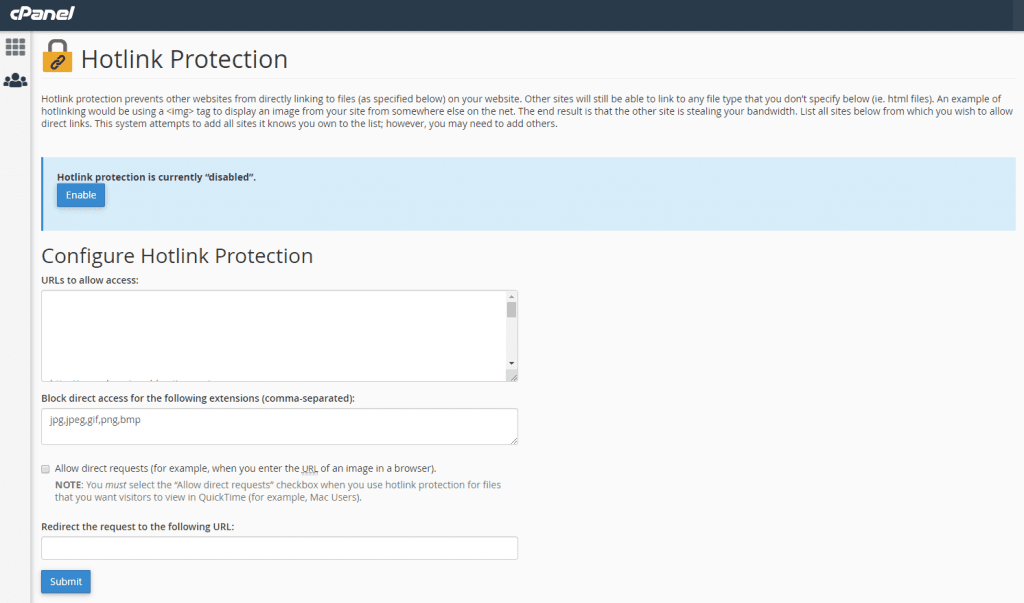
hot link protection

The issue though can be that you have some images like banners or videos you want to have hot-linked. This is why we suggest adding a subdomain called hotlink.your-main-domain.com (replace your-main-domain.com with your actual domain name in this case). This also helps you manage your stats better because you would show visitors that are really just seeing your content that is on another site if linked from your main site. By having all your hot-linked content on the subdomain, your stats will only show the true information from visitors to your website.
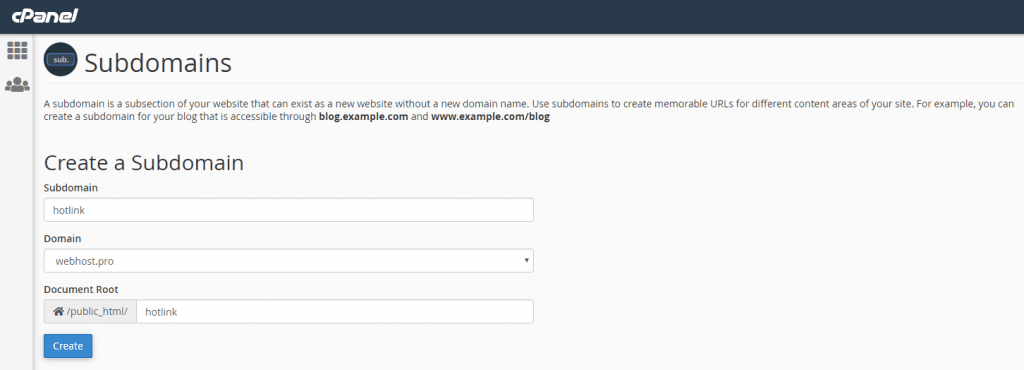
sub domain

Once you have the subdomain set up, you’ll want a separate FTP account or use the file manager to add the content to be hot-linked. I use Filezilla normally, so in that program, you can easily have multiple FTP account connections. Now any content you upload into the hotlink subdomain you can link to directly from the URL hotlink.your-main-domain.com (replace your-main-domain.com with your actual domain). A link to an image like this would be https://hotlink.your-main-domain.com/image.jpg for example. Make sure and use the https:// in front so the link does not trigger SSL security errors.

Connect with us

Web Host Pro websites, vps, and servers

Recent Posts

  • How to sell things online

    How to sell things online

  • The Rules for Success in 2026

    The Rules for Success in 2026

  • Cloud Hosting Explained

    Cloud Hosting Explained

  • Top 3 Myths About the Web Hosting Industry

    Top 3 Myths About the Web Hosting Industry

  • The New Era of Data Center Careers

    The New Era of Data Center Careers

  • Most popular web builder

    Most popular web builder

  • Do We Still Need “http://”?

    Do We Still Need “http://”?

  • How to Start a WordPress Blog in 2026

    How to Start a WordPress Blog in 2026

  • WordPress Load Control

    WordPress Load Control

  • How to Add Video to WordPress in 2026

    How to Add Video to WordPress in 2026

  • Mac vs PC in 2026

    Mac vs PC in 2026

  • Top 5 Reasons Websites Load Slow

    Top 5 Reasons Websites Load Slow

  • A Website Problem That Almost Derailed A Business

    A Website Problem That Almost Derailed A Business

  • 7 Tips for Building a Successful Website Business

    7 Tips for Building a Successful Website Business

  • PHP in 2026: Legacy Support, Security, Speed, and the Future of the Web

    PHP in 2026: Legacy Support, Security, Speed, and the Future of the Web

Popular Posts

Log in
All Rights Reserved Web Host Pro 2001-2026