

Menu
web host pro logo
  • Home
  • News
  • Servers
  • Websites
  • Business
web host pro logo
hot linking
June 4, 2019March 8, 2023

How to manage hot linking on your website

Share it here

Hotlinking can be a big issue if you have high-definition images or videos. Without Hot Link protection, the content can be shown on other websites burning through your bandwidth and hiding where it is from so you don’t even get credit for it. This also can be an issue with your content being used at places you don’t want it to be. Blocking Hot Linking is very easy with the Hot Link protection tool in your cPanel shown here.
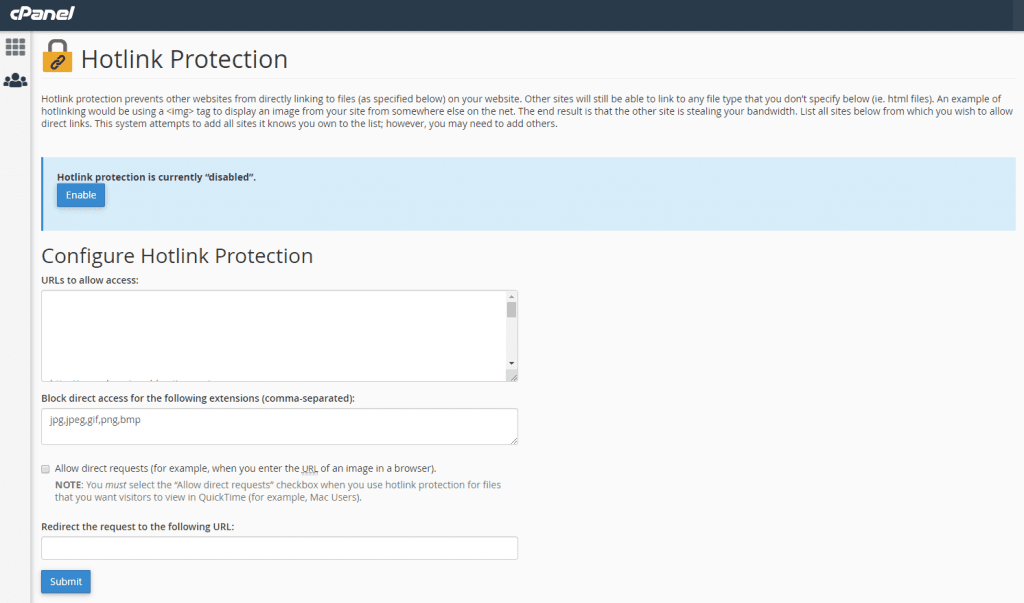
hot link protection

The issue though can be that you have some images like banners or videos you want to have hot-linked. This is why we suggest adding a subdomain called hotlink.your-main-domain.com (replace your-main-domain.com with your actual domain name in this case). This also helps you manage your stats better because you would show visitors that are really just seeing your content that is on another site if linked from your main site. By having all your hot-linked content on the subdomain, your stats will only show the true information from visitors to your website.
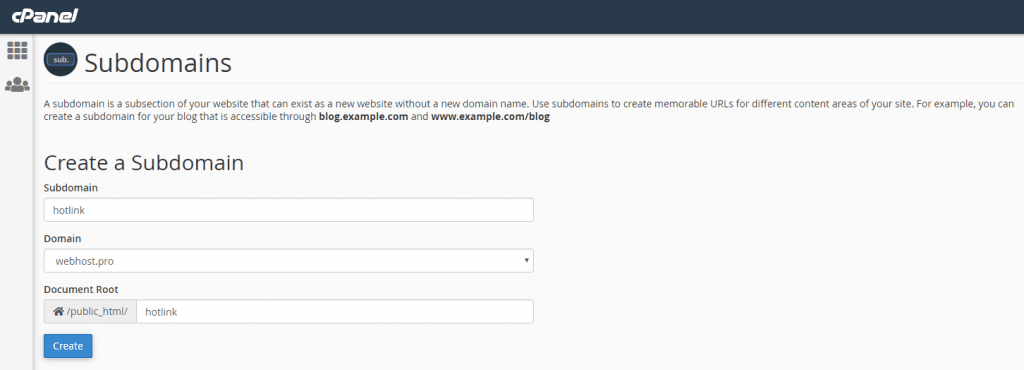
sub domain

Once you have the subdomain set up, you’ll want a separate FTP account or use the file manager to add the content to be hot-linked. I use Filezilla normally, so in that program, you can easily have multiple FTP account connections. Now any content you upload into the hotlink subdomain you can link to directly from the URL hotlink.your-main-domain.com (replace your-main-domain.com with your actual domain). A link to an image like this would be https://hotlink.your-main-domain.com/image.jpg for example. Make sure and use the https:// in front so the link does not trigger SSL security errors.

Connect with us
WordPress

Visit Web Host Pro Web Hosting, VPS, and Dedicated Servers

Recent Posts

  • IP Subnet Masks

    IP Subnet Masks

  • Building a website has changed dramatically over the years

    Building a website has changed dramatically over the years

  • What to Do If Your Website Gets Hacked

    What to Do If Your Website Gets Hacked

  • Need an Older Version of PHP? We Understand

    Need an Older Version of PHP? We Understand

  • Your Website's Home Page Vibe

    Your Website's Home Page Vibe

  • A New Chapter: Web Host Pro owner starts HudsonHost

    A New Chapter: Web Host Pro owner starts HudsonHost

  • How to Manage Inodes and Improve Website Performance

    How to Manage Inodes and Improve Website Performance

  • Top 10 Reasons New Startups Fail

    Top 10 Reasons New Startups Fail

  • Marketing Basics for Building a Professional Web Presence

    Marketing Basics for Building a Professional Web Presence

  • Free Word Invoice Template

    Free Word Invoice Template

  • Website Content Filtering

    Website Content Filtering

  • cPanel and LiteSpeed Explained

    cPanel and LiteSpeed Explained

  • .htaccess Information, Tricks, and Tips

    .htaccess Information, Tricks, and Tips

  • How to Add a Web Host Pro Banner or Logo to Your Website

    How to Add a Web Host Pro Banner or Logo to Your Website

  • Softaculous App Web Hosting

    Softaculous App Web Hosting

Popular Posts

Log in
All Rights Reserved Web Host Pro 2001-2026