
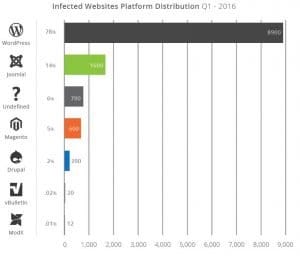
Now over two decades old, WordPress is still sweeping the Internet for a fast, SEO-based way to build a website. By far, it’s the world’s most popular content management system. Like anything on the Internet, the more popular it is, the more hackers will poke at it to see what can happen. More than any other type of site, you need to make sure your WordPress is secure and updated often! Once it’s hacked, it’s game over, and a new site with new files will need to be added. Some credible places are even saying that 70% of WordPress sites are vulnerable. And other sources like Forbes and Securi are saying over 30,000 WordPress sites are hacked a day. We’re not trying to scare you away from WordPress, the truth is we love it and use it on at least five of our websites. We just want to emphasize how important it is to secure WordPress as much as possible.
With that said, here are the top 5 things you can do to secure your WordPress blog right now. There are no links to WordPress plugins because they often change, and we don’t want to send you to an outdated plugin. Just search from your addon section in your WordPress and find the best plugin at the time you are reading this.
- Have a strong administrator username and password
Believe it or not, with all the advanced tech and hackers sifting through code, the most common way a hacker gets into any website is still the login details. Change your username and password to something unique that has some numbers, a capital and maybe even a random character like a $ sign. - Use a captcha from Google
That “are you human” thing you see everywhere is one of the best ways to fend off hackers. In fact, Google keeps track of shady access attempts and can block bad people before they can even try to access your site. You can see a sample of it here: Web Host Pro Register
Search for a plug-in called: Captcha - Change your login URL
That’s right! You can change your login URL, so these hacker punks can’t even find your login page. Something like your-main-domain.com/wp-login.php could be your-main-domain.com/leave-me-alone.php
Search for a plug-in called: change login URL - Use SSL (https://)
Not only does SSL help fend off hackers and crackers. It also helps you rank better in Google and look more professional. Some themes and plugins do not work with SSL, so you might need to find new ones that are with the times. Having SSL with your blog is becoming standard, so start the transition if you have not already. Keep in mind, all Web Host Pro web hosting plans come with free SSL! - Update anything and everything
Next to bad logins, the main way hackers get into WordPress is outdated plugins and WordPress cores. WordPress makes it so easy to update, just log in and hover over the word Dashboard to see if there are any updates. Don’t be afraid to update, if you are not doing it at least every six months you will eventually get hacked.