

Why Browsers Hide It and What It Means for the Modern Web
When you see text prefixed by “http://” or “https://”, you’re looking at the protocol that powers the web: the Hypertext Transfer Protocol. For decades, it was a visible and essential part of every URL. Today, most browsers hide it by default. At first glance, that seems like a simple UI cleanup. In reality, it reflects a much larger shift in how the internet works, how users perceive trust, and how security is enforced.
This change is not just cosmetic. It represents the evolution from an open, loosely defined web to a security-first ecosystem where encrypted connections are the baseline and anything less is actively discouraged.
Why Browsers Started Hiding “http://”
Modern browsers like Google Chrome, Safari, and Mozilla Firefox no longer show “http://” or even “https://” in the address bar in most cases. The reasoning is straightforward:
- Users recognize domains, not protocols
- The protocol rarely influences user behavior
- Removing it reduces visual clutter
Google formally introduced these changes in Chrome to simplify the address bar and focus attention on the domain itself. Documentation and updates around this behavior can be found at https://blog.chromium.org/2018/09/simplifying-chrome-address-bar.html
From a usability standpoint, this makes sense. Most users care about “example.com”, not whether it uses HTTP or HTTPS. But the hidden complexity underneath matters more than ever.
The Real Shift: HTTPS Is No Longer Optional
The bigger story is not that browsers are hiding “http://”. It’s that the web has moved almost entirely to HTTPS.
HTTPS encrypts data between the user and the server using TLS. This protects sensitive information such as logins, payments, and personal data from interception.
According to Google’s transparency report, over 95 percent of web traffic in Chrome is now served over HTTPS:
https://transparencyreport.google.com/https/overview
Major platforms have driven this shift:
- Google uses HTTPS as a ranking signal
- Cloudflare provides free SSL certificates
- Let’s Encrypt made SSL accessible to everyone
You can review Google’s official guidance on HTTPS adoption here:
https://developers.google.com/search/docs/advanced/security/https
The result is a web where HTTPS is expected by default, and HTTP is treated as outdated and unsafe.
Browsers Don’t Just Hide HTTP. They Actively Discourage It
Modern browsers go far beyond hiding “http://”. They actively warn users when a site is not secure.
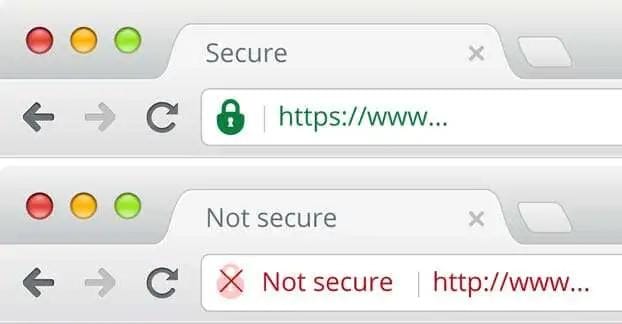
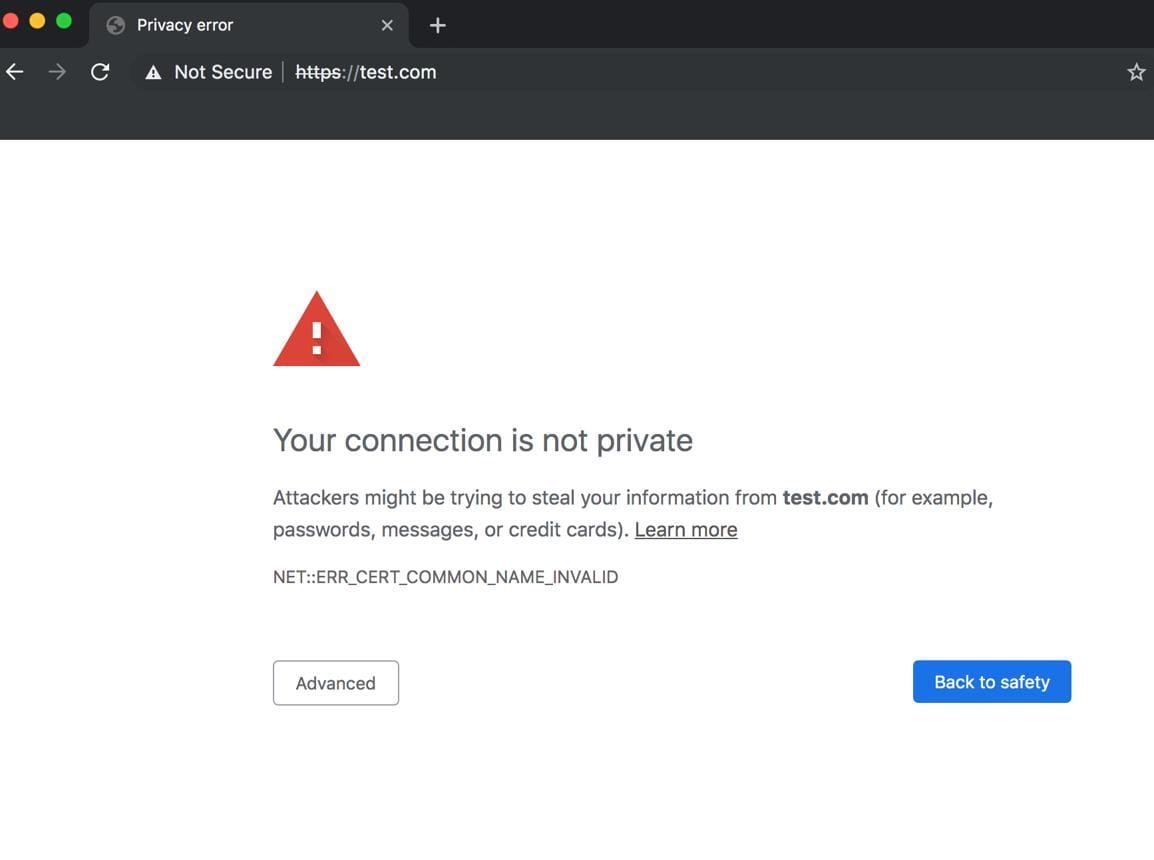
Examples include:
- “Not Secure” labels in the address bar
- Full-page warnings for unsafe connections
- Blocking mixed content (HTTP assets on HTTPS pages)
Google’s official security UI explanation is here:
https://support.google.com/chrome/answer/95617
In some cases, browsers make HTTP sites harder to access entirely. Features like automatic HTTPS upgrades attempt to load the secure version first, falling back to HTTP only if necessary.
The Original Concern: Does Hiding HTTP Create Confusion?
Early discussions raised valid concerns. Some developers argued that removing “http://” could:
- Break auto-linking systems that rely on the prefix
- Confuse users when copying and pasting URLs
- Reduce awareness of security differences
Those concerns were valid at the time. Tools like messaging apps, forums, and email clients often depended on “http://” to detect links.
Today, most modern platforms handle URLs more intelligently. Auto-linking systems recognize domains without needing a protocol prefix. The ecosystem adapted.
However, one subtle issue remains: hiding the protocol can make it harder for users to distinguish between secure and insecure sites unless they understand browser indicators.
UX vs Security: A Delicate Balance
The decision to hide “http://” reflects a trade-off between simplicity and transparency.
On one side:
- Cleaner UI
- Less cognitive load
- Focus on recognizable domains
On the other:
- Reduced visibility into connection type
- Potential for phishing confusion if users rely only on domain appearance
This is why browsers emphasize other visual signals like:
- The padlock icon for HTTPS
- Warning labels for HTTP
- Certificate details for advanced users
More details on how Chrome handles this can be found here:
https://www.chromium.org/Home/chromium-security/marking-http-as-non-secure/
What This Means for Website Owners
If you run a website, the implications are clear.
- HTTPS is mandatory
Not optional. Not a “nice to have.” Required. - User trust depends on security indicators
Visitors notice warnings immediately. Even non-technical users associate “Not Secure” with risk. - SEO is directly impacted
Google prioritizes HTTPS sites in rankings. - Browsers may degrade your site experience
Features like geolocation, payments, and modern APIs often require HTTPS.
If your site still runs on HTTP, it is effectively being phased out of the modern web.
What’s Next: The Future of URLs and Web Identity
The evolution of the address bar is not finished. Several trends are emerging:
1. Even less emphasis on full URLs
Browsers are experimenting with showing only the domain or brand name to reduce phishing risks.
2. HTTPS-only browsing modes
Many browsers now include settings that force HTTPS connections whenever possible.
3. Certificate transparency and identity signals
Security indicators may shift from simple padlocks to more advanced identity verification.
4. Rise of alternative navigation methods
Search, voice, and app-based navigation reduce reliance on manually typing URLs altogether.
5. Continued deprecation of insecure protocols
HTTP will likely become increasingly restricted over time.
Practical Takeaways
- Always use HTTPS for any website or application
- Ensure SSL certificates are valid and auto-renewed
- Avoid mixed content issues
- Educate users to look for security indicators, not just domain names
- Test how your site appears across different browsers
For performance and security optimization, combining HTTPS with modern infrastructure such as LiteSpeed and CDN delivery can significantly improve both speed and trust. A practical reference for high-performance hosting environments is available at https://webhostpro.com/
FAQ
Is HTTP completely gone?
No, but it is heavily discouraged and increasingly restricted by browsers.
Do users need to type https:// anymore?
No. Browsers automatically handle it in most cases.
Does HTTPS slow down websites?
No. With modern TLS and HTTP/2 or HTTP/3, HTTPS is often faster than HTTP.
Can hiding HTTP increase phishing risks?
Potentially, but browsers counter this with stronger visual warnings and domain emphasis.
Do all websites need SSL certificates?
Yes. Even informational sites should use HTTPS for trust and compatibility.
Hiding “http://” was never about removing functionality. It was about acknowledging that the protocol itself is no longer the user’s concern. Security is now expected, not optional. The real question is not whether we need “http://”. It’s whether your site meets the expectations of a web that has already moved beyond it.
Explore high-performance, secure hosting built for today’s standards: https://webhostpro.com/